Practical guide · Trifaar studio
Building AI Sports Highlights: From Livestream to Scout-Ready Clip
A technical walkthrough of the media pipeline connecting local-match streaming, video segmentation, multimodal event detection, human review, clip generation, and player data.
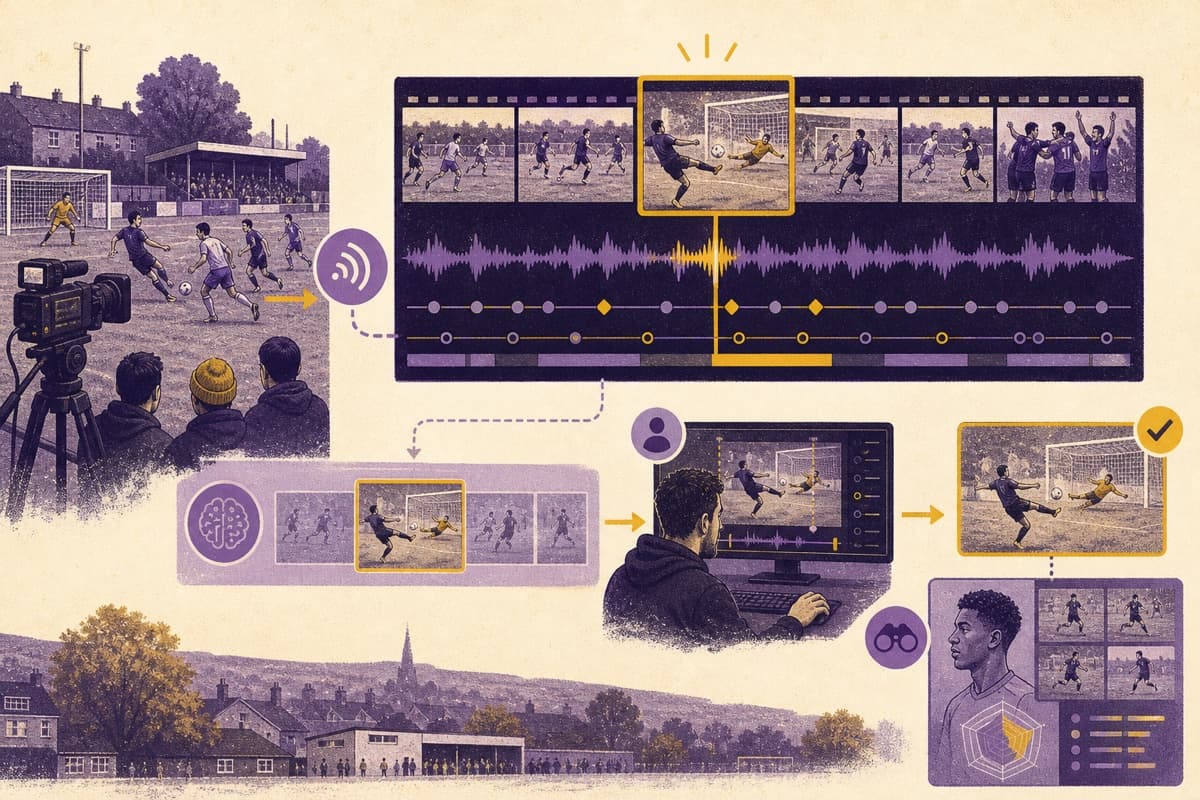
A ninety-minute match contains only a handful of moments most viewers will replay. Finding those moments reliably is not one AI task. It is a media pipeline.
JUU was built around that reality. The platform connects local-league streaming, player discovery, and AI-assisted highlights of goals and important match events. A full stream gives a match coverage; structured clips give players something scouts can actually review.
Here is what has to happen between the live camera and a useful highlight.
1. Preserve the stream and its context
The system needs more than video bytes. Every recording must remain associated with the league, fixture, teams, participants, clock, and stream session.
A low-latency service such as Amazon IVS can deliver the live experience, while a recording pipeline stores media for processing. RTMPS may carry the contribution stream and HLS the viewer output. Whatever technology is selected, stable identifiers must connect the live event, recording, and application data.
If that context is lost, a detected goal becomes an anonymous clip.
2. Normalize the media
Local-league footage varies in frame rate, resolution, audio quality, camera position, connectivity, and overlays. Before detection, the pipeline may need to validate the file, normalize timestamps, create analysis renditions, and separate or clean audio.
FFmpeg is commonly used for transcoding and precise clip generation, but the workflow around it matters: jobs need queues, retries, progress state, and idempotency so the same recording is not processed or published twice.
3. Break the match into workable segments
Long recordings are expensive and slow to analyse as one block. Segmenting video creates bounded windows for parallel processing and recovery.
Shot changes, technical cues, audio peaks, scoreboard changes, commentary signals, and game-specific motion can all help identify candidate windows. Amazon Rekognition's segment detection, for example, returns timestamps and frame-level information for shot and technical-cue boundaries. Those signals do not identify a football goal by themselves, but they can support a larger pipeline.
4. Detect events using more than one signal
A goal may create several clues:
- ball and player movement near the goal area;
- a rapid change in crowd or commentary audio;
- a scoreboard update;
- a referee or restart pattern;
- reactions that continue after the event.
Combining signals is often more robust than trusting one visual classifier. The exact model depends on the sport, camera conditions, available training examples, and latency requirement.
The system should produce an event type, timestamp range, confidence, and supporting signals—not simply “goal detected.”
5. Generate a clip with temporal context
The detection timestamp is rarely the ideal beginning of the highlight. A useful clip needs the build-up, event, and reaction.
Clip logic should choose a pre-roll and post-roll, respect segment boundaries, avoid cutting mid-action, and preserve audio synchronization. It may generate a review proxy first, then a higher-quality final clip after approval.
6. Keep a person in the publishing loop
False positives and missed events affect player visibility and trust. A reviewer should be able to see the candidate on a match timeline, adjust clip boundaries, correct the event type, identify the relevant player, and approve publishing.
Confidence thresholds can route obvious candidates differently from uncertain ones, but the downstream application—not the model—should enforce who may publish or edit match records.
7. Connect the clip to scouting data
The highlight becomes more valuable when it links to the player, fixture, team, competition, event type, and match time. Scouts should be able to move from a clip to the broader player and match context.
This information model is what turns a video-processing feature into a scouting product.
8. Measure the whole pipeline
Track event precision and recall on representative footage, reviewer correction rate, processing time per match, failed jobs, clip-generation latency, storage and delivery costs, and the percentage of approved clips successfully attached to the right player.
A detector can score well on clean professional footage and fail on the camera conditions local leagues actually use. Evaluation data must resemble production.
How Trifaar can help
Trifaar provides product design, live-video engineering, backend systems, AI event detection, temporal media processing, cloud operations, and review-workflow development. JUU shows how we connect those specialties around a commercial outcome: helping local leagues distribute matches and helping prominent players become easier to discover.
If you have an existing streaming product, Trifaar can begin with a pipeline audit or a contained event-detection pilot before recommending a full rebuild.